The OMMA photo requirements are simple, but you have to meet every one of them. Your photo must be less than six months old, show your full face, and use a plain white or off-white background. It also has to meet size and file rules. If it misses even one rule, OMMA will not accept your application (Oklahoma Medical Marijuana Authority [OMMA], 2026).
Luckily, you can take a photo that passes with just your phone and a blank wall. This guide shows you how, step by step.
What are the OMMA photo requirements?
The OMMA photo requirements come from OMMA’s photo guide, last updated May 13, 2026. Here is the full list in plain words:
- Recent: Take the photo within the last six months.
- Background: Use a plain white or off-white wall.
- Face: Look straight at the camera with your eyes open. Your whole face must show.
- Head and shoulders: Keep both in the photo. Do not zoom in too close.
- Posture: Sit or stand up straight. Do not tilt your head or turn your shoulders.
- Hair: Keep it off your face, eyebrows, eyes, and ears.
- No extras: Remove glasses and hats. Also, keep hands, objects, and other people out of the photo.
- No changes: Do not use filters, borders, or text.
- Light: Avoid shadows on your face.
- Direction: Hold the camera upright, not sideways.
- Match: The photo must look like the photo on your ID.
You can read every rule in OMMA’s application photo requirements.
How to take your OMMA photo at home
You can take a photo that meets the OMMA photo requirements in about five minutes. Just follow these steps:
- Find a blank wall. Pick a plain white or off-white wall with nothing on it.
- Get good light. Face a window or a bright lamp. That way, you avoid dark shadows on your face.
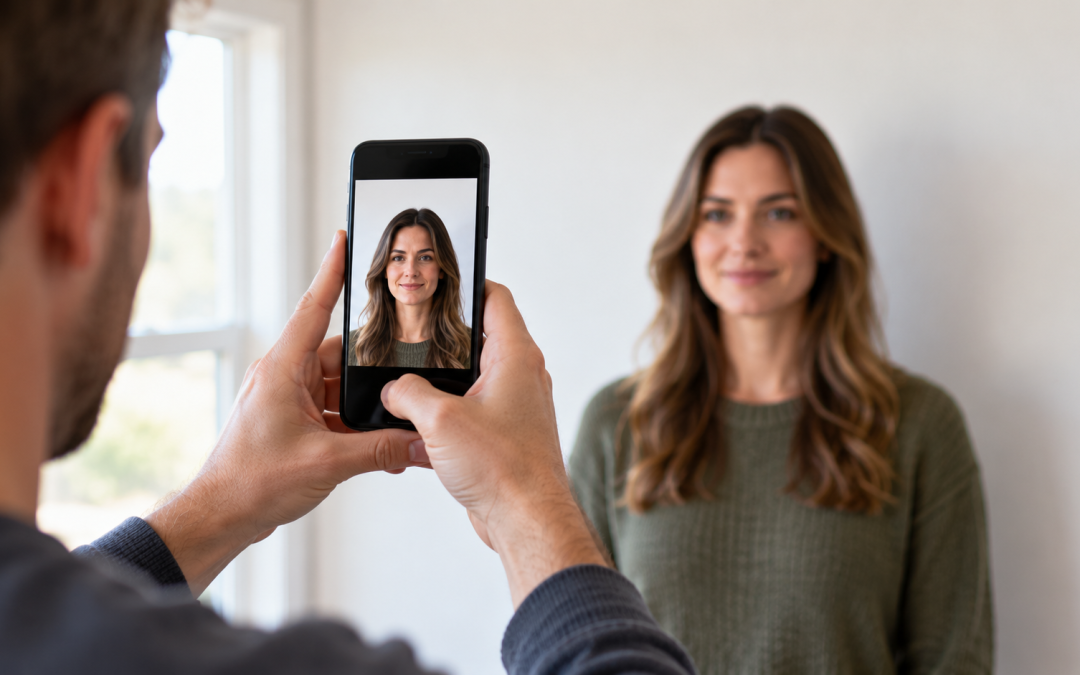
- Ask a friend for help. Have someone hold the phone at your eye level, about four feet away.
- Hold the phone upright. OMMA wants a tall photo, not a wide one.
- Get ready. Take off your glasses and hat. Then push your hair back off your face.
- Look straight ahead. Keep your eyes open and your head level.
- Check the photo. Make sure your head and shoulders both show, with no shadows or filters.
Also, keep a digital copy. OMMA does not accept a printed photo, so you need the file itself.
Can I take my OMMA photo with my phone?
Yes, you can take your OMMA photo with your phone. In fact, OMMA suggests using a smartphone camera for a clear digital photo (OMMA, 2026). However, turn off any beauty mode or filter first. Even a small filter can break the rules.
What size does my OMMA photo need to be?
Your OMMA photo must be between 600 by 600 pixels and 1,200 by 1,200 pixels. It must also be a JPG, PNG, or GIF file. On top of that, the file must be 3 MB or smaller (OMMA, 2026).
Most phone photos are bigger than that. So, you will likely need to shrink your photo before you upload it. Here is how to check the size first:
- iPhone: Open the photo in the Photos app and tap the info button. You will see the pixel size and the file size.
- Android: Open the photo in Google Photos and swipe up. The details show the pixel size and the file size.
If the photo is too big, use a simple photo resizer app or a computer to make it smaller. Shrinking the photo is fine, as long as it stays between 600 and 1,200 pixels. Also, OMMA crops tall photos into a square after you upload them. So, keep your face in the center of the frame.
Can I wear glasses in my OMMA photo?
No, you cannot wear glasses in your OMMA photo. OMMA asks you to remove eyeglasses before you take the picture. Sunglasses are not allowed either.
Hats come off too, with two exceptions:
- Religious head coverings: These are fine if your full face shows. Then you add a signed statement that the covering is part of your religious dress.
- Medical head coverings: These are fine if your face shows clearly. In this case, you add a signed doctor’s statement that you wear it every day for medical reasons.
Common OMMA photo mistakes to avoid
Most photo problems come from a few easy mistakes. Before you upload, make sure you avoid these:
- A busy or colored background, like a bookshelf or a blue wall
- Dark shadows from a lamp behind you or above you
- A selfie held too close, which cuts off your shoulders
- A tilted head or a photo taken from the side
- A beauty filter, border, or sticker
- Another person, a pet, or your hand in the frame
- An old photo from more than six months ago
- A sideways photo instead of an upright one
Want someone to double-check everything for you? Our team offers OMMA application help for $30. We log in with you and help you upload the right documents and photo. That way, your application has a better chance of going through the first time.
Why was my OMMA photo rejected?
OMMA flags a photo when it breaks one or more of the rules above. For example, a shadow on your face or a filter can be enough. If that happens, OMMA emails you the reasons. Then you can log back in, upload a new photo, and send it again.
For the next steps, read what to do if your OMMA application is rejected. You can also learn how to check your OMMA application status while you wait.
Common questions about OMMA photo requirements
Can I use my driver’s license photo?
No, not a picture of your license card. OMMA does not allow borders or text in your photo, and a picture of your card has both. Instead, take a new photo. Your new photo should still look like the photo on your ID.
Can I smile in my OMMA photo?
OMMA’s guide does not set a rule about smiling. However, your eyes must be open, and your face must look straight at the camera.
Do I need a new photo when I renew?
Usually, yes. OMMA wants a photo from the last six months, so a photo from your last application will likely be too old. For more renewal tips, see our Oklahoma MMJ card renewal guide.
Start your OMMA application with Okie MMJ Doctor
Meeting the OMMA photo requirements is one part of a smooth application. The first part is a form from a doctor registered with OMMA. Okie MMJ Doctor has helped more than 50,000 Oklahoma patients since 2019. Plus, if your doctor does not approve you, you pay nothing for the visit.
Use code STOPRX to take $10 off, so your visit is just $89. Book your same-day visit today. Have a question about your photo? Contact our team, and we will be glad to help.